Wednesday, 2 December 2015

Final Vision Post # 4 - Project Submission, Challenges and Summary

Final Project

I am super excited to have created a library website for my school and to finally have it done. This is something that I have wanted to do for a very long time, but never had the vision, opportunity or even the knowledge of how to go about creating a website.

Here it is...my Weebly Library Website: http://qgelibrary.weebly.com/


Image result for quigley elementary
 
By creating this website, I am advocating for the library as a place for everyone in my school community. I want people to know that the library is not just a place to sign out books,...it is so much more! Also, I want to show that as the teacher-librarian, I am here to help collaborate with teachers and support students and parents. They will hopefully see that I have the knowledge and skills that can be valuable to them.

I have learned a lot through this whole process of creating a website, as well as throughout this course. This course has been very inspirational in helping me develop my vision of a library website. Prior to this course, I would not have attempted to create a website, nor a blog, or even acquired the knowledge needed to create my own blog and/or website. Therefore, this course has taught me a lot of things, such as, how to create a blog, how useful Twitter is for my Personal Learning Network and so much more.

I am extremely grateful to have a wonderful and supportive LIBE 477 PLN to learn from and share ideas. I have learned so much from all of you, so THANK YOU!

Creating this website was challenging because it's something I didn't think I would able to successfully complete. Using Popplet helped me to organize my ideas and set up my vision for the website more clearly. At the beginning of the project, I had so many ideas of what I wanted to add, but my thoughts were all over the place. Once I was able to organize my thoughts and plan out what I wanted to include, I felt better about doing this project. It really helped me to focus on knowing who my audience was for this final project.

As I have said before, this library website is a living project. In other words, this is something that I hope to continually add to as needs in my school community change. I am still debating with myself about what things I could still add. Currently, I am trying to make it as simplistic as possible to ensure accessibility is there. My fear is that if the website becomes too crowded with information and links that no one will want to use it.

Overall, this website is something that I am proud of. I worked hard on it and love the way it looks. Also, I was able to connect with my school district's Weebly education account, which helps with accessibility for my school community. I plan on introducing this website at our next staff meeting and our school's next PAC meeting. Also, I have added this link to our school's website and will be adding information about the library website to the school newsletter. Can't wait for everyone to see it and use it!

Image result for fireworks white background


Wednesday, 25 November 2015

Final Vision Post # 3: Project Development

Library Website Development 

 
My final vision project is underway. To review, my final vision for the future is to create a school library website that includes a number of things that would benefit teachers, staff, students and parents, including a library blog for up to date information about what's happening in and around the library.
 
I recently opened a Weebly account and started creating my school's library website. I am maybe halfway through setting it up, although I plan to make it a continual project by updating regularly, which means that it will never be complete as it is will be an ongoing project or a "living document."
 
What I have learned so far about using Weebly...
 
1. Weebly is easy to use.
2. There are lots of options to choose from for designs and layouts.
3. If you get stuck on something, Weebly has helpful tutorials on whatever you need help with.
4. Can easily change a layout by adding or deleting options.
5. Easy to navigate around.
6. Most of all, I am really pleased with the way it looks so far! It's beginning to look as I envisioned.
 
Here is an example of what my home page looks like so far...


Overall, I would definitely recommend using Weebly to others if they want to start a website.
 
Some things that haven't worked out as planned.... First, I had to request from our school district a Weebly account and password, so that I could create a website under our school districts Weebly. Although I requested this a while back, the tech department for our school district has been super busy with myEd B.C. tech problems and had to put my request farther down their list of things to do. Therefore, I went ahead and created my own account and I am currently still waiting for the school district account. My hope is that I can take what I have created so far and add it to my school district, so that I won't have to recreate everything. Also, I am constantly rethinking what I plan on adding to the website.
 
Again, there is so much information that I would like to include, but I need to step back and not make it too overwhelming for myself or my intended audience. I need to make sure that I stick to my intentions and make a website that is useful, helpful and easy to navigate.


Tuesday, 17 November 2015

Final Vision Post # 2: Elaborating on my Ideas, Scope and Direction

What Quigley Elementary Library has to Offer

 
My focus this week is to continue to develop my final vision by elaborating on my ideas, scope and direction. After reading fellow classmate's final vision blog posts, I started to rethink my own vision. My initial thoughts were to create a library blog, however now I am thinking of creating a library website with a link to a library blog. Also, my target audience was originally geared more towards teachers, now I would like to make the library website for our whole school community of teachers, staff, students and parents. I want to create a library website that can be easily accessible and easy to navigate around. Therefore, I took the idea of using Popplet from Jen Lane to organize the menu headings and subheadings for my library website.
 
 
Now that I have a clearer idea of what direction I would like to go with my final vision, I have a more focused rationale.
 
My rationale for this project is to provide a source of information to everyone at Quigley Elementary School about the Library, such as, what's happening in the library, who's in the library, new books, why libraries are important and also, research information, including digital and media literacy and links to web tools and anything that will be useful for all teachers, staff, students and parents of Quigley Elementary School. 
 
Elaborate on your audience, their needs, and how your final project is going to address this goal: I would like teachers to have a place to go and find out about digital and media literacy, about inquiry-based learning, about web 2.0 tools, etc. Also, a place for teachers to see how valuable the library is to teachers and students. For students, I want them to be able to see what is happening in the library and how to be a part of it. For parents and staff, they can use the website to help with projects, homework and see everything the library has to offer.
 
Why a website? I am choosing to do a website rather than just a blog for my final vision project because I wanted to make it easier for everyone to navigate through all the information that I wish to include. Also, our school district uses Weebly for schools and teacher websites. I have never used Weebly before, but I know that many teachers in my school district have their own Weebly classroom sites and I like how they look and are easy to navigate around.
 
References:
 
Lane, Jen. (2015, November 11). Vision Post #1: A Virtual Library Learning Commons. Schoollibraradventures. Retrieved from: http://blogs.ubc.ca/schoollibraryadventures/2015/11/11/vision-post-1-a-virtual-library-learning-commons/


Tuesday, 10 November 2015

Final Vision Post # 1: Available Library Services

What the Library can do for you! 

 
Image result for school library as the place to be
 
My final "Vision of the Future" of Teacher-Librarianship is to advocate for the school library by creating either a blog and/or prezi about all the library services available to teachers at my school and thus their students. I will need to consider what library services to add to my "Vision of the Future", my audience and how I will present each service. 
 
Library Services available to consider:
  • Curriculum Resource Centre (CRC) available to all teachers in our school district. Show teachers how to access these resources (example: EBSCOhost)
  • How to effectively use our Library OPAC
  • Research tools available to teachers and students and teaching researching skills: How to do Research
  • Book clubs: highlight books being read and shared. Have students write book reviews and/or recommend books.
  • Helpful Web 2.0 tools: highlight and recommend new Web 2.0 tools (example: Powtoon)
  • New books: introduce new books added to the library collection and how the new books can be used in the classroom (example: Adrienne Gear's Reading/Writing power books). 
  • Introduce the importance of Makerspace activities: share what students are making and creating and how they are actively engaged.
Image result for makerspaces in school libraries
 
  • Emphasize the importance of reading and the library.


References:

Dambruoso, A. (2014, July 18). 10 things classroom teachers need to know about modern school librarians. [Blog post]. Retrieved from https://libraryallegra.wordpress.com/2014/07/18/10-things-classroom-teachers-need-to-know-about-modern-school-librarians/

LArepresents. (2014, February 16). Dr. Stephen Krashen defends libraries at LAUSD Board Meeting. [youtube video]. Retrieved from https://www.youtube.com/watch?v=JAui0OGfHQY

Makerspace picture. (2014, June 28). Retrieved from http://orchardschoollibrary.weebly.com/library-makerspace.html

Your School Library picture. (2011, May 23). Retrieved from http://timgauntley.blogspot.ca/2011/05/who-needs-school-libraries.html


Wednesday, 4 November 2015

Inquiry Project # 5 - Summarizing Topics and Interests

Summarizing Topics and Interests

 
What are your key takeaways, learning and direction after all this exploration?
I have learned many things over the past few weeks. Some key things that I have learned is how to blog, which I hope to continue by creating a library blog accessible and applicable to everyone in my school community. Also, I've learned how valuable Twitter is for finding, learning about, and sharing information and I've learned what a PLN is and how important it is to my professional development as a Teacher-Librarian.

Some other key takeaways, just to name a few...
  • Never stop learning
  • Network, network, network
  • Promote a reading culture
  • Share ideas
  • Explore
  • Research
  • Collaborate

What are the new avenues for development in your personal and professional practice?
 I would like to continue developing my ICT skills, pedagogy and professional learning. Overall, I have learned that educators and professionals are connecting and sharing their learning through Twitter. By simply, following such educators and professionals, I will be able to maintain my connections and networks, to further develop my knowledge, experience and skills.
 
What are you going to take with you, moving forward from your own explorations and also from the explorations of others in this class?
I am going to take my Personal Learning Network including my blog, my gmail, Twitter, my Symbaloo, and feedly.
 
Other things that I would like to take along and remember include from Heather Brooks, the idea that the first person who reads a new book, and tells about the book, gets a sticker placed in the book showing their name, grade and date when they read the book. Example: This Book Was First Read By.
From Alexis Tsougrianis, I really liked his thoughts about equal access for mobile devices in which he states that "it's important for schools to provide access to all students, not just those with their own devices."
From Jen Lane the article she mentioned about Teacher Librarians as Thought Leaders, Teacher Librarians as Thought leaders (and light bulbs) by Joyce Valenza.
From Julie Brown, the image of what teachers want for professional development and the youtube video about Teacher-Librarians and Classroom Teachers as collaborative partners:


If you could pick just one topic that resonated with you, which is it and why?
 It's hard to pick just one topic as I found that I have learned a lot and I connected with most of the topics. However, if I had to pick just one topic, it would be fostering reading cultures in schools because everyone needs to learn to read so that they can read to learn and I love getting students excited about reading. Most importantly, this topic resonated with me because I'd like to continue making the library a fun and exciting place to learn and through this topic and sharing with our PLN, I have found new ways to do this, which I am looking forward to trying at my school.


References:

Aguilar, Elena. Ten Ways to Cultivate a Love of Reading in Students. Edutopia. November 4, 2015: Edutopia article Listing 10 ways to Cultivate a Love of Reading.

Brooks, Heather. (October 7, 2015). THE LOVE OF READING: Fostering it in School Libraries. LibraryLook Blog. Retrieved from: https://libraryvirtualblog.wordpress.com/2015/10/07/the-love-of-reading-fostering-it-in-school-libraries/

Brown, Julie. (October 24, 2015). Teacher Librarians supporting Teacher ICT ProD. Julie Brown Blog. Retrieved from: http://juliebro.blogspot.ca/2015/10/teacher-librarians-supporting-teacher.html

Lane, Jen. (October 15, 2015). Inquiry Blog #2: Building Relationships, Connections and Networks. School Library Adventures Blog. Retrieved from: http://blogs.ubc.ca/schoollibraryadventures/2015/10/15/inquiry-blog-2-building-relationships-connections-and-networks/

Tsougrianis, Alexis. (October 29, 2015). Inquiry Topic #4 - Mobile Devices, Mobile Libraries. Mr. T's Library Journey Blog. Retrieved from: http://mrtlibrary.blogspot.ca/2015/10/inquiry-topic-4-mobile-devices-mobile.html.


Thursday, 29 October 2015

Inquiry Project # 4 - The World Needs Libraries

The World Needs Libraries: Looking at Libraries in Developing Countries and the Use of Mobile Devices in Classrooms


 "The only thing that you absolutely have to know, is the location of the library." - Albert Einstein

How are libraries in developing countries supporting their patrons? What types of resources could be best utilized in these environments? Do mobile devices play a role in these libraries? How can they assist their patrons in accessing more up to date information? Do libraries only need books? Should libraries in developing nations rely on donations and weeded books from developed nations?


These are some tough questions because each developing country is different in regards to libraries, technology, access and usage. For instance, in Pakistan’s Punjab province, a girl uses her mobile phone to send a message to her teacher. After sending, she receives messages from her teacher in response, which she uses to practice her writing skills. She does this from the safety of her home due to the insecurity of the region in which she lives (Winthrop & Smith). In Peru, laptops sit in a corner of a classroom covered with dust. The laptops were intended to improve students’ ICT skills, but without the proper support for teacher training in how the laptops are used, no repair and maintenance available, and with outdated software, the laptops have become useless (Winthrop & Smith).

So, what are the answers? Libraries in developing countries do more than just provide books for students. For example, libraries in developing countries help farmers to connect to new markets, help entrepreneurs find capital to start businesses, and help health workers access research to provide up to date care to patients (Hamilton).

From my research I have found several organizations that help support libraries and their patron's needs in developing countries. In particular, I was drawn to the Electronic Information for Libraries (EIFL) website that supports the access of technology information in developing countries. EIFL believes that everyone should have access to knowledge and information. They focus on building libraries' ICT skills through training of librarians and developing tools and resources.

Librarians scan the computers at the Bwera Information Centre and Community Library in Kasese District in Western Uganda.
Librarians are teaching farmers new skills in Bwera Information Centre and Community Library in Kasese District in Western Uganda.
 
Furthermore, EIFL introduced tablets into libraries to help with student's education. They teamed up with eLimu, which creates digital content for schools in fun formats like animations, video and quizzes. eLimu pre-loaded the tablets with educational material, and taught the librarians how to integrate the tablets and the content into a learning program, and how to teach the children to use the tablets (EIFL, http://www.eifl.net/programme/public-library-innovation-programme/public-libraries-contributing-education).
 
School students use tablets pre-loaded with educational content in fun formats in Kibera Public Library.
 
It is uplifting to know that developing countries are gaining in information literacy and have at least some access to 21st Century Learning. However, there is always more that can be done, especially in more rural areas of the world. The following is a list of Library Projects that are helping developing countries gain even more access to information. 


Library Projects in Developing Nations:

Final Thoughts: All libraries should have access to the most up to date information possible. Thus, should libraries in developing countries rely on donations and weeded books from developed nations? Not all the time. Libraries in developing countries deserve to have books that provide current information. By relying on weeded books, these libraries become limited in current content. However with limited budgets, it is always nice to get donations. Therefore, libraries in developing countries should not completely rely on donations and weeded books alone, but also have access to online information and newer content books as well.


References:

Electronic Information for Libraries (EIFL). (2015, October 28) [Retrieved from: http://www.eifl.net/]

Hamilton, Stuart. (2013, March 12). Stamping out poverty as well as books? How libraries can support development. Guardian News and Media. [Retrieved from: http://www.theguardian.com/global-development-professionals-network/2013/mar/12/libraries-power-global-development].

Photo: Librarians are teaching farmers new skills in Bwera Information Centre and Community Library in Kasese District in Western Uganda. [Retrieved from:
http://www.eifl.net/programme/public-library-innovation-programme/we-advocate-libraries-advance-development]

Photo: School students use tablets pre-loaded with educational content in fun formats in Kibera Public Library. Photo credit Elaisha Stokes [Retrieved from: http://www.eifl.net/programme/public-library-innovation-programme/public-libraries-contributing-education]

Room to Read. (2013, April 30). Room to Read | Our Work. Retrieved from: https://www.youtube.com/watch?v=JpyeZ6BcslA

Winthrop, Rebecca, & Smith, Marshall S. (January 2012). A New Face of Education: Bringing technology into the classroom in the Developing World. Brooke Shearer Working Paper.
 

Wednesday, 21 October 2015

Inquiry Project # 3 - Teacher-Librarians as Professional Educators

Teacher-Librarians as Professional Educators: Supporting Teacher's ICT Development

Book, Education, School, LiteratureTeam, Silhouettes, Personal, Businessmen

“To be a librarian is not to be neutral, or passive, or waiting for a question. It is to be a radical positive change agent within your community.” ― R. David Lankes


Just like the quote states, we as Teacher-Librarians need to be active in our roles. We need to seek out new information, collaborate, teach, share, inspire and continually develop our knowledge and skills. We need to be valued as an irreplaceable source. We need to advocate to our school community the valuable skills and roles that we can provide.

How can Teacher-Librarians support Teachers?
 
The first thing we as teacher-librarians need to do is develop a positive working relationship with teachers. We need teachers to feel comfortable working and collaborating with us and we need to feel comfortable working with them.
 
Next, we need to be able to collaborate with teachers. Collaborating on a unit or lesson is a great way to support teachers. Dambruoso states in her blog titled 10 things classroom teachers need to know about modern school librarians that librarians "love collaboration" and that "we can even build new lesson plans with teachers." Again, if you have a positive working relationship with teachers, you can approach them and suggest collaborating on a unit or lesson. Also, suggest ways to help with a project the class may be working on. Make yourself available to help teachers wherever you can. After all, the more the teacher-librarian is seen actively engaged in collaboration with teachers, the more other teachers in the school will want to have the same kind of support (Cooper & Bray, 49).

Ideas / Solutions / Suggestions for meeting the ICT development needs of teachers at my school:
  1. Offer brief workshops after school or during the lunch hour on new web tools that can be beneficial and enhance student work.
  2. With support from principal, during staff meetings introduce a new resource to teachers.
  3. Email teachers links to new resources. Offer to help with the new resource in their classroom.
  4. COLLABORATE using a new resource.
  5. Integrate a new web resource into a unit or lesson.
  6. Continually research and find new ideas and resources.
  7. Share ideas and resources.
  8. Create a PLN among teachers and students.
  9. Create a Library Blog with access to resources for teachers, students and parents.
  10. Use Symbaloo to bookmark valuable resources for teachers. Create a tile for different units, grades, or teachers.


References:
 
Cooper, O.P., & Bray, M. (2011). School Library Media Specialist-Teacher Collaboration: Characteristics, Challenges, Opportunities. TechTrends, 55(4), 45-55.

Dambruoso, A. (2014, July 18). 10 things classroom teachers need to know about modern school librarians. [Blog post]. Retrieved from https://libraryallegra.wordpress.com/2014/07/18/10-things-classroom-teachers-need-to-know-about-modern-school-librarians/

Teacher, Computer Ms. (2013, April 9). Using Symbaloo (a bookmarking service) in Education. [youtube video]. Retrieved from https://www.youtube.com/watch?v=Kbp2CSS7cnk


Wednesday, 14 October 2015

Inquiry Project # 2 - Developing My Own ICT Skills and Pedagogy

 Developing my own ICT Skills and Pedagogy

Where to Start?

How can I continue to develop my own skills, pedagogy and professional development? What strategies, tools and resources can I implement to further develop my knowledge, experience and skills?

My Learning word cloud -  worditout.com
Since the beginning of this course, I have learned an enormous amount about technology. I didn't even really know what Twitter was. Nor did I know how easy it was to set up and post a blog. Now, I am learning about PLNs (Personal Learning Networks) and using feedly to connect with classmates. What an amazing learning community! I did not know that all these fabulous ways of connecting with others was so easy to access and really easy to learn. Of course, I still have a lot more to learn and that is part of my professional development plan. I plan to continue using PLNs, such as Twitter and feedly to continually get new ideas, collaborate, share, explore and learn.  
 
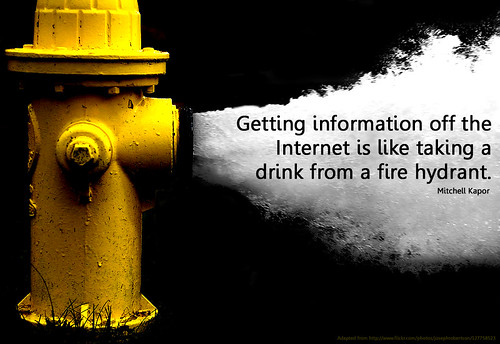
It is amazing the amount of information and sharing that can be found on the web. As others have said, "don't re-invent the wheel." The wheel has already been invented it is just a matter of finding it and using it properly. The fire hydrant image below is how I feel when I am searching for information, ideas, tools or resources. It can be mind-blowing!
 

information hydrant

How can I get past all the information and weed through to the good stuff? Well, I just learned about a fantastic bookmarking tool called Symbaloo. This great tool allows you to have one place for all your favourite websites and it allows you to see what other people are bookmarking, so that you can follow their bookmarks too. What a great way to organize your learning networks.


Using Symbaloo will definitely help me to stay connected to my personal learning networks and to continue building my ICT skills, tools and resources.

A particular learning network that I came across is The Global Teacher Librarian Network. This network has many helpful links for teacher-librarians, including things like library routines to school library journal articles. This site will be added to my bookmarking tool so that I can access it more easily and regularly.

Overall, I have learned that educators and professionals are connecting and sharing their learning through Twitter. By simply, following such educators and professionals, I will be able to maintain my connections and networks, to further develop my knowledge, experience and skills. Also, I plan to set up a Symbaloo homepage to help me collect and organize valuable resources that I gather from educators and professionals on Twitter. Furthermore, my own professional development plan is to start a blog for my school library, where I can use it to connect with teachers, students and parents. Afterall, "blogs can be great tools for students to engage in book reviews, keep lists of favourite books and share thoughts with others" (Clarke, 48). I will continue to develop my ITC skills, pedagogy and professional learning because I am a life long learner who loves to challenge myself to continually learn new things.

References:

Clarke, Lane W. (2014). Reader Response 2.0 Using Technology to Support Literacy Growth. The NERA Journal, 50(1), 44-50.

Edublogs Teacher Challenges: Free professional learning for educators from educators. (2015). http://teacherchallenge.edublogs.org/
 
Fire hydrant image from: http://teacherchallenge.edublogs.org/step-6-using-curation-tools/

Symbaloo: Your bookmarks and favourites in the cloud. (2015). https://www.symbaloo.com/home/mix/13eOcLj6h4

Word Cloud Image - created using worditout.com


Tuesday, 6 October 2015

Inquiry Project # 1 - Promoting Reading in Schools

Promoting Reading in Schools


How do I promote reading in my school?


As a part-time teacher-librarian in an elementary school, here is what I do to help foster a reading culture:
  • provide a welcoming space to read, select, discover, explore and enjoy books.
  • display new and recommended books / authors.
  • participate in Battle of the Books - students read a set list of novels and in the spring they battle against other schools in our district by answering questions about the books read.
  • author visits (coming up on Friday, October 16th - Canadian author Eric Wilson will be presenting to our intermediate grades)
  • participate in Drop Everything and Read (October 26,2015)
  • host 2-3 Book Fairs each school year (one in the fall, one in the spring and we usually host the Scholastic 50% off warehouse sale for the Interior)
  • local Western Hockey League players visit and read to students
  • buddy reading - intermediate students are teamed up with primary students and they read together once a week.
  • at home reading awards - each month students who complete their at home reading for the month can enter for a chance to win a $10 Chapters gift card (one price for each grade).

What tools, strategies and resources can be implemented to encourage and support a school-wide reading program?

 
There are a number of things that I do at my school to promote reading, however there are always more things that myself and others at my school can do. The following are some tools, strategies and resources that I would like to try to implement at my school:

Image result for graphic novel book club
1. Start a graphic novel book club. By using graphic novels for a book club, I am hoping to encourage readers who normally wouldn't join to come out and try something new. In an article by William H. Teale, Jung Kim and William Boerman-Cornell called High Quality Graphic Novels can make Positive Literacy Contributions to the Lives of Elementary-School students, they talk about how "reading graphic novels may be a 'way in' for helping children who are difficult to reach through traditional print text." I hope that I can engage such students by introducing graphic novels as a step towards "traditional print text." Also, it helps to know what graphic novels are appropriate for each grade. The best graphic novels for children is a great place to start to gather recommended graphic novels for grades K-8. Furthermore, I would like to ensure that teachers and admin are on board with starting a graphic novel book club. To do this, I have found a video that I hope would convince them of such:

 
2. Have students use technology to write and present a book review for their peers. In particular, I liked how one school used podcasts to promote their favourite books: School Races to Promote Reading Through Podcasts by Cara Bafile. I especially liked how Bafile talks about using older students to teach younger students how to use the tools needed to create a podcast. This is a great way to get everyone at school involved.
Another way for students to use technology to review books, as suggested by Lane W. Clarke, is to use a community site like Goodreads, in which a class profile could be set up and "after students read a book they can evaluate the book by writing a review and assigning it a rating" (48). Also, I could have students recommend books on a school library blog (something that I hope to start in the future).


Other Thoughts?

This is just the beginning...I love to read all kinds of books and I hope that just my passion for books and reading will be a start for fostering a reading culture in my school. I wish for all students to become as passionate a reader as I am one day. Therefore, I plan to continue researching and adding to my tools and strategies to make my library the best it can be for all learners.
 
References:
 
Bafile, Cara. (2012). School Races to Promote Reading Through Podcasts. Education World, http://www.educationworld.com/a_tech/tech/tech252.shtml
 
Clarke, Lane W. (2014). Reader Response 2.0 Using Technology to Support Literacy Growth. The NERA Journal, 50(1), 44-50.

McKnight, Katie. (2014). Katie McKnight Podcast Series #8: Reaching & Teaching Reluctant Readers. TeachHub.com. https://www.youtube.com/watch?v=EkU30NZ6qT4

Teale, William H., Kim, Jung, and Boerman-Cornell, William. (2008) High Quality Graphic Novels can make Positive Literacy Contributions to the Lives of Elementary-School students. Book Links, 17(5), http://www.ala.org/offices/resources/its_elementary_graphic_novels

Images:

Battle of the Books image from: http://teleread.com/publishing/battle-books-really/

Graphic Novels Book Club image from: http://www.larchmontlibrary.org/programs/graphic-novel-book-group/